
All Posts
6 min read
read
Securing RDP: Best practices against remote desktop attacks
RDP is one of the most frequently exploited attack vectors in cybersecurity. Learn how to secure it or replace it with a better solution.

Published
13 Mar 2026
Aktualisiert
29 Sep 2026
Introduction
The Remote Desktop Protocol (RDP) is everywhere in enterprise environments, and it is one of the most frequently exploited attack vectors in cybersecurity. Open RDP ports are scanned and probed millions of times every day by automated tools looking for weak credentials and unpatched vulnerabilities.
Key Takeaways
- Open RDP ports are scanned millions of times every day by automated attack tools.
- RDP has been the leading delivery method for ransomware for several years running.
- Network Level Authentication (NLA) and multi-factor authentication are the bare minimum.
- Secure remote access gateways offer a safer alternative to exposing RDP directly.
Why RDP is such a rewarding target
RDP gives direct graphical access to remote systems. That makes it just as valuable to legitimate administrators as it is to attackers. Once an attacker gains access over RDP with valid credentials, they have practically the same control as a local administrator sitting at the machine.
There is an economic argument on top of that. RDP is everywhere, standardized, and requires no specialist knowledge to use. For attackers it is not a niche target but a default route, one that can be probed automatically at enormous scale.
Common attack techniques against RDP
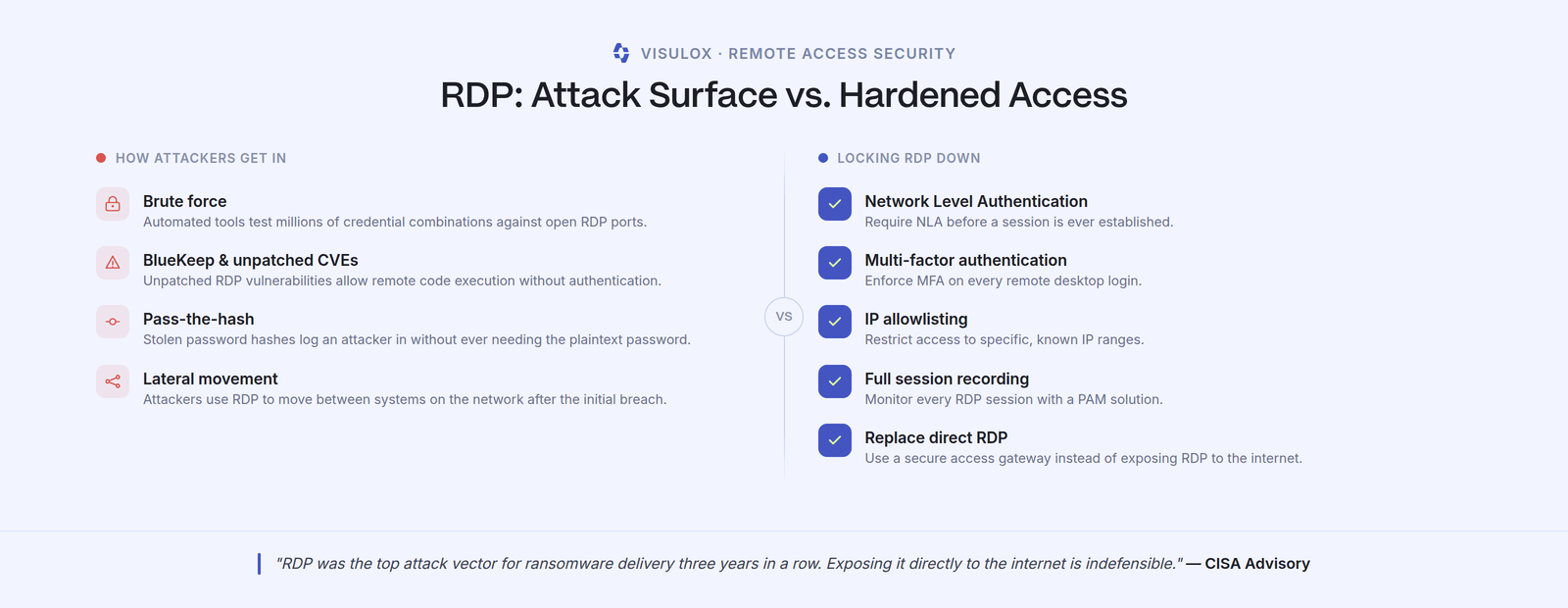
- Brute force: Automated tools test millions of credential combinations against open RDP ports. Account lockouts alone help little, because attackers go slow and distributed to stay under the threshold.
- BlueKeep and related CVEs: Unpatched RDP vulnerabilities allow remote code execution without authentication. What a CVE identifier does and does not tell you about urgency is the judgement call that matters here.
- Pass-the-hash: Stolen password hashes are used to log in without ever needing to know the plaintext password. Password complexity offers no protection, because the password never has to be guessed.
- Lateral movement: Attackers use RDP to move between systems on the network after the initial breach. That movement is what turns a single compromised workstation into a company-wide incident.
Hardening your RDP configuration
When RDP is necessary, it has to be hardened thoroughly. Five measures form the minimum:
- Require Network Level Authentication (NLA) so authentication happens before the session is established rather than after.
- Enforce multi-factor authentication on every remote desktop login. A stolen hash alone is then no longer enough.
- IP allowlisting: restrict access to specific, known IP ranges rather than the open internet.
- Full session recording: monitor every RDP session with a PAM solution so an audit can reconstruct what happened.
- Replace direct RDP: a secure access gateway instead of open RDP ports on the internet.
Changing the default port is deliberately absent from that list. It deters casual scanning but not an automated tool that sweeps the whole port range anyway. As a standalone measure it mostly produces a false sense of security.
Why hardening alone is not enough
Even a properly hardened RDP path remains a direct route from outside onto a target system. The access decision is made once, at connection time, and the session then runs without further checks. Controlling administrative access seriously requires a point in between: a central access gateway where approval, scoping and recording take place.
How to replace RDP, SSH and VNC with a single secure access gateway without losing capability is covered separately.
RDP and external service providers
In practice, the most commonly unsecured RDP path does not belong to an employee but to an external service provider. Such access gets set up for a project, outlives it, and appears in no inventory because it sits organizationally with another department.
The target state is the same as for internal administrators: access on request only, scoped to the individual target system, with a clear expiry. That is the principle behind zero standing privileges, and it is also what auditors want to see on supply chain security.
RDP security and regulatory requirements
For entities in scope of NIS-2, an open RDP port is no longer purely a technical matter. The minimum measures under § 30 BSIG require access control, multi-factor authentication and auditability. A remote desktop path reachable directly from the internet with no session logging satisfies none of those three.
In industrial environments the BSI IND.3.2 building block on remote maintenance applies as well, requiring need-based approvals and documented traceability explicitly.
A short checklist for your current state
Three questions establish your RDP exposure quickly. First: is port 3389 – or a relocated substitute – reachable from outside, and does anyone know on which systems? Second: is every RDP session attributable to a named person, or do shared accounts exist? Third: for any session in the last three months, can you show who opened it and what happened inside it? If any of those three cannot be answered, you have a project rather than a configuration question.
Contact
Your Direct Path to Secure Remote Access
Speak directly with a cybersecurity expert.
Conclusion
RDP does not have to be a risk. With the right controls in place, or better yet replaced by a modern secure access solution, organizations can provide the remote connectivity their teams need without exposing themselves to unnecessary danger.
Table Of Content:
Talk to Our Experts
Speak directly with a VISULOX security expert and find out how to protect your infrastructure.
Share:
Lorem ipsum dolor sit amet, consectetur adipiscing elit. Suspendisse varius enim in eros elementum tristique. Duis cursus, mi quis viverra ornare, eros dolor interdum nulla, ut commodo diam libero vitae erat. Aenean faucibus nibh et justo cursus id rutrum lorem imperdiet. Nunc ut sem vitae risus tristique posuere.
Insights on IT Security and Privileged Access
Expert knowledge, practical tips, and the latest trends in PAM, compliance, and secure remote work — straight from the amitego team.